
AI presents both opportunities and risks for deaf students. With so many different tools available, identifying what is genuinely useful can be difficult. Here we’ll consider some key developments that are having an impact on accessibility for linguistic access and study.
Exploring where accessibility and innovation meet, we will move from more established tools like automated captioning and note-taking to emerging uses, including language modification support, visual content creation, AI sign language translation, and smart glasses.
Please note in this blog, we use the word ‘deaf’ to include people who are Deaf, deaf, and hard of hearing.
Captioning: Creation and Correction
Automated captioning and transcription remains one of the most common and valuable uses of AI to support deaf students.
From a technology perspective, captioning is more available and more capable than ever before. Many platforms now offer built-in live captions, automatic transcription and translation as standard. Tools like Microsoft Teams continue to introduce improvements, such as multilingual speech recognition and more customisation options for the presentation of captions.
Developments in speech recognition models continue, OpenAI’s Whisper for example, is trained on a larger and more diverse dataset of audio samples, making it more robust at recognising a wider range of accents and types of speech than earlier models. Whisper is open-source, and Matthew Deeprose, Accessible Solutions Architect at the University of Southampton, has produced a practical guide to using Whisper on desktop to create transcripts, alongside a range of other useful accessibility-focused resources.
Despite technical improvements, we continue to see that availability does not always translate into access. Captions may not be switched on, transcripts may not be enabled, and some content may not be recorded at all. Where recordings do exist, institutions also often have limited capacity to review and edit captions at scale. Which is required for Public Sector bodies in the UK udner the 2018 Public Sector Bodies Accessibility Regulations. AI tools can create the first draft, but a person still needs to review and correct it.
The University of Edinburgh has been exploring how large language models (LLMs) can support human editors in this process. At a recent Accessibility community drop in session, Nelly Iacobescu, Media and AI Service Manager at Edinburgh, explained how they are exploring the use of LLMs to support human captioners. This has shown promising results, particularly for correcting specialist terminology and identifying author names, in some cases even outperforming human editors. Importantly, the AI is positioned as a support tool, increasing editor capacity so more captioned content can be produced more quickly.
Edinburgh’s example is at a large scale, but at the same time, individuals may find using general-purpose AI tools like Copilot or Gemini can be an effective support for correcting transcripts, even with simple prompts. This can be an effective first pass, particularly to add punctuation and formatting, which will need to be checked over, but can still reduce the turnaround time for providing quality captions and transcripts to a deaf student.
AI-Supported Note Taking
For deaf students, having assistance with note taking can be a critical part of accessibility. During a lecture, for example, they may be simultaneously reading captions, lip-reading, and/or following a sign language interpreter, as well as needing to take down notes. Having support to capture and organise notes can reduce this burden significantly.
AI note taking tools are now more capable than ever. Most record and transcribe audio, but differ in how they help students organise and interact with that content. Tools like Genio focus on supporting manual note taking with a platform that allows students to link their notes to timestamps in a recording, making the content easier to review and navigate. Generative AI features are used to create summaries and quiz questions from the material.
Other tools have implemented even more generative features. Jamworks, for example, can automatically generate structured notes, summaries, quizzes and flashcards. It also offers a conversational chatbot interface, which students can use to interrogate the content further.
In Jisc’s AI team, we supported two FE colleges to trial Jamworks, and staff noted particular benefits for cases where students usually required a human note taker. Staff also reflected on the practical challenges of relying on human note takers, including availability and cost, while questioning whether AI-generated notes could fully match the value of a human note taker with subject-specific knowledge. Notably, some learners preferred to continue manual note taking, seeing it as integral to their learning process.
These differing approaches to generative AI features do offer some variety in note taking tools. Some students may want support with taking notes manually, so a tool like Genio might suit them. Whereas those who would benefit more from reviewing automated notes and accessing further learning materials may prefer the Jamworks approach.
Language Modification and Readability
For some deaf students, particularly those whose first language is British Sign Language (BSL), English grammar, idioms and sentence structure can be a barrier to comprehension.
Bespoke AI tools for reading, like Tailo, and built-in tools, such as Microsoft’s Immersive Reader, can support learners here. There are also explorations into using general purpose AI tools to support reading. Generative text tools can effectively transform text to improve clarity and readability without diluting meaning. Many tools also now offer preset prompts for these modifications, and users can create their own to meet specific needs.
Features such as custom instructions and memory can also make it easier to personalise those outputs, improving the accessibility of the tools themselves. Initial outputs from these tools can often be overly long and densely worded, which can be off-putting rather than supportive. Further, while many tools now include audio-based interactions, there are not comparable features to support visual interaction like sign language inputs at this time. In the meantime, making use of customisation options could make a real difference.
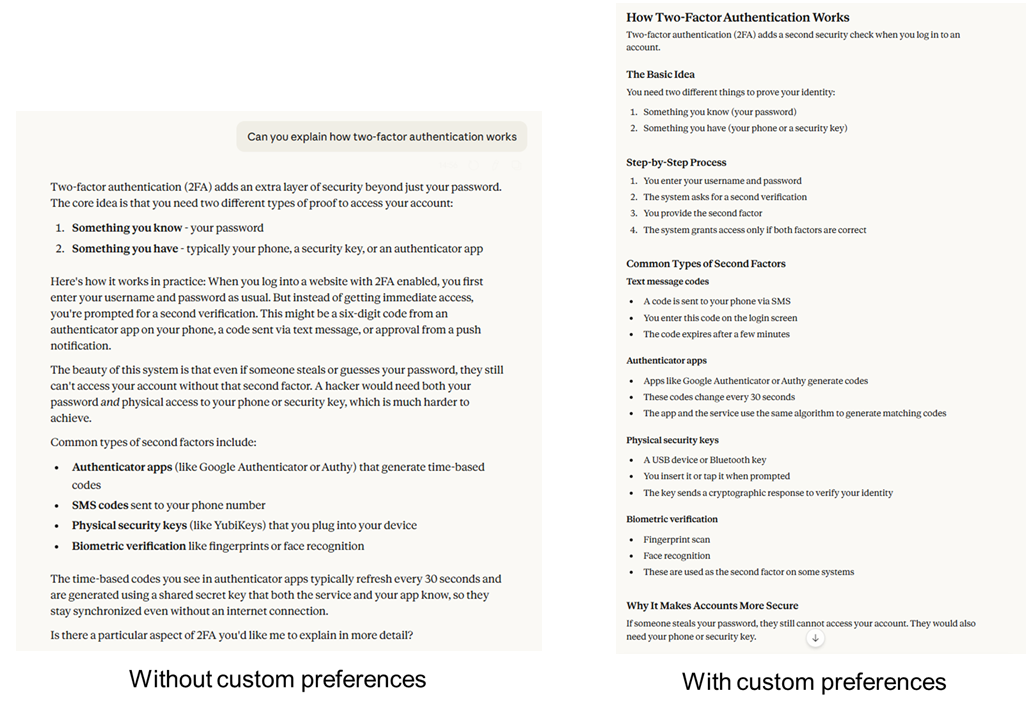
Most popular tools now offer some form of this customization. Anthropic’s Claude has custom preferences. Copilot calls these custom instructions. ChatGPT has both custom instructions and ‘personality’ settings to inform its word choice and tone. Regardless of platform, these options typically involve an open prompt box where users can write in their preferences.
Some examples of custom instructions which may be helpful:
- Be literal, avoid idioms (“on the same page”, “ballpark”, “low-hanging fruit”) and figurative language
- Be clear whether you are providing explanations, asking a question or offering options
- Use short sentences
- Use fewer commas
- Do not over-simplify concepts, remove technical terms unnecessarily or talk down
- Do not assume access to audio or spoken interaction
- Focus on clarity, predictability, and structure
- Use more bullet point lists and numbered steps
- Include clear headings in responses
These approaches may also be explored not just for individual study, but to improve access to course materials more broadly. At a Jisc accessibility drop-in session last year, researchers from the University of Southampton and King’s College London shared findings on using generative AI for accessible communication. They emphasised that these tools work best as a support to human editing and highlighted several key recommendations:
- Transform small sections of text at a time
- Avoid terms like “easy read”, which can lead to infantilising outputs
- Always review outputs for contextual accuracy
Visuals
Image generation has advanced rapidly in the past year, raising questions about whether it can be a useful tool to create engaging, visual learning materials to support deaf students. Findings from our image generation pilot suggest that it could be particularly effective for illustrating difficult or abstract concepts quickly and clearly.
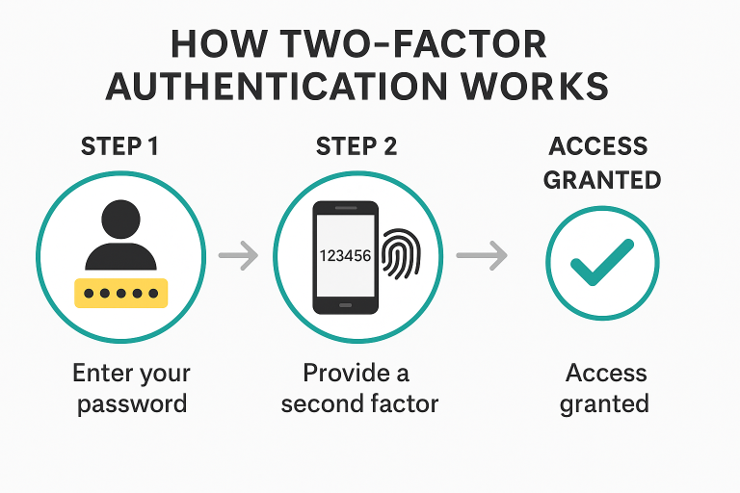
Tools have a variety of methods now for generating visuals too. Above we have an image generated by Microsoft Copilot. This came from a conversation asking Copilot to explain two-factor authentication. The diagram did take a little while to generate, but it has come out with clear text and illustrates the key concept quite well. Notably, this was the first generation of the image, further refining it with more prompts would be recommended.
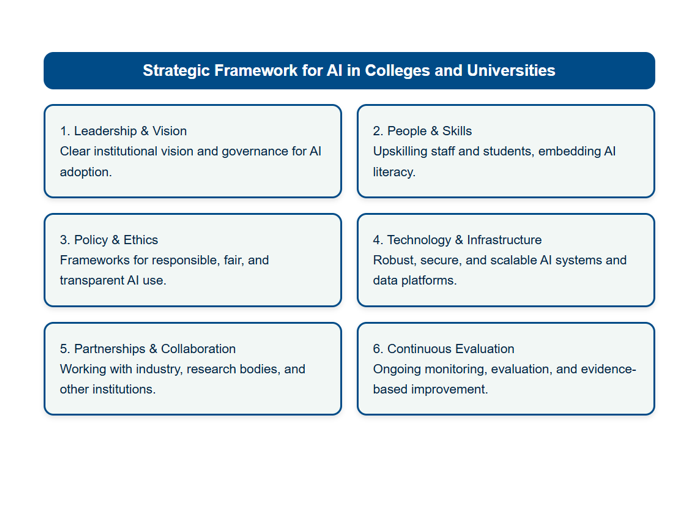
Next, we have a diagram generated by ChatGPT using the Canvas feature. This actually does not use image generation methods but essentially generates code to create diagrams for the user. In this example ChatGPT was asked to create a diagram based on part of our Strategic AI Framework. The output perhaps isn’t the most engaging, but it does transfer and organise the information well. Notably, in this example we did need to specify in the prompt to use an accessible colour palette as the initial output had poor contrast. Importantly, when generating any content with AI, it is unlikely to be automatically accessible and must be checked – adding accessibility details like specific colour palettes to the prompt though, can help with getting better outputs.
Perceptions around AI-generated imagery are varied however, and ethical issues particularly around artists’ rights and copyright issues are prevalent in people’s minds. Some tools may feel more acceptable to users than others if this is the case, such as Adobe Firefly which has been trained on licensed content from their own photo library. However, overall image generation does remain a controversial area for many.
Writing Support
AI writing tools have progressed far beyond basic grammar correction. For deaf students who understand academic concepts but find it challenging to express them in formal written English, these tools may offer a way to overcome a significant barrier.
Generative tools can support clarity, structure, tone and academic style. They can help identify unclear arguments, refine phrasing and align writing with academic conventions. We’ve explored current AI writing tools before and found that generative AI features both in writing support tools (e.g., Grammarly) and general purpose tools (e.g., ChatGPT, Gemini, and Copilot) can provide a new level of support often even at free subscription levels.
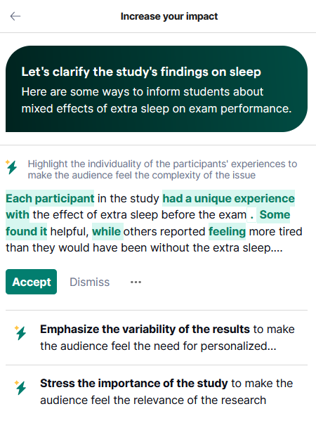
However, AI-supported writing is a contentious area for education, with significant concerns around the impact of generative AI on academic integrity. There is a strong case however for considering AI’s potential to enhance linguistic accessibility in education. As Kelly Webb-Davies has noted, people are already using these tools to overcome bias against how they communicate. Penalising that use may risk reinforcing existing inequalities.
At the same time, there is a need to ensure that use of AI does not limit opportunities to develop writing skills. As with other assistive tools, thoughtful policy and practice which acknowledge the role of AI tools as assistive technology are key. Our AI in Education communities regularly discuss and share good practice in this area.
AI Sign Language Translation
AI-powered sign translation is a key topic of discussion currently, with some companies beginning to make AI translation for BSL available commercially in the UK. Notably, in the US, there are further advancements in the technology for American Sign Language (ASL).
We’ve explored the scene for BSL in detail last year in a previous piece – AI Sign Language Translation: Ready for Education?
Our key findings though, were that current technology for BSL is still at a stage where translations are predominantly one-way (text into a signed video), and there are quality issues around the translations and presentation of non-manual aspects of sign language. Currently, for education, where we might be looking for a service to translate learning materials at scale or provide interpretation, AI translation of BSL is not ready.
This remains an area to watch closely, and there are encouraging projects underway. The SignGPT project for example, was awarded over £8 million in funding last year and aims to build a sign language AI model designed around the needs of the deaf community. It is a five-year research project running from 2025 to 2030, underscoring how long-term this work can be.
There are also growing calls for the regulation of this technology from both deaf organisations and individuals, looking to ensure development is deaf-led, supports the community meaningfully, and does not erase regional or cultural variation in sign languages. Reports from the British Deaf Association, the European Union of the Deaf and the Minderoo Centre at Cambridge highlight these concerns and more.
Smart Glasses for live captions
Smart glasses which can offer live captions through augmented reality displays are attracting renewed attention. Much of the public interest has been driven by Meta’s recent release of their Meta Display model, launched in the US last year and expected in the UK later this year.
Captioning glasses from assistive technology providers though have been available for some time. XRAIs ar2 glasses, for instance, offer live captioning, presented in the wearer’s eyeline and have the ability to save and share captions to other devices.
The affordability of smart glasses more generally has improved, with a move to having the user’s smartphone do the processing rather than having on-glasses processors, bringing the cost of glasses down in recent years.
Meta’s Display model also has a live captioning feature, and based on the US pricing looks like it will be similarly priced to models like XRAI’s but will have additional features, including video recording capability and an AI assistant powered by their Llama models. Questions are being raised, though as to whether products like Meta’s, which are designed for wide commercial appeal, adequately meet the same accessibility needs as targeted solutions. Captioning is a feature of these devices, not the core function.
In addition, privacy concerns in education may limit adoption of smart glasses – particularly those like Meta’s with cameras and video recording capability. Overall, understanding the technical differences between devices will be essential to determining whether they can be useful in education, though it may not be straightforward.
We are currently exploring these issues in more detail and have begun with a comparison of smart glasses models, which will be followed up by an exploration of their potential to support teaching and learning.
Where Next?
There are real opportunities for using AI to support deaf students, but we must be honest about where the technology is useful now and where it still needs work. We want to make sure that as AI becomes embedded in education, deaf learners are not left out of the conversation.
Many of the use cases discussed here are early, small-scale or exploratory – there isn’t yet a deep body of research in this space. More evaluation, sharing of lessons and evidence gathering is needed.
If you are doing research, piloting tools, or have insights to share on AI and accessibility for deaf students, we’d love to hear from you. Get involved through our Assistive Technology Network.